


Help Center
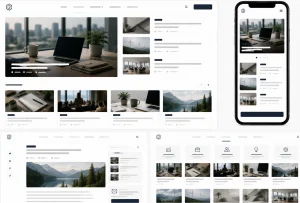
We launch your help center with search, sections and a support form.
 Add the solutions you’re interested in to “My project”
 Submit a request and get the result



We guarantee the quality of our services

Included in service
 Support request form
Basic SEO and FAQ markup
Sections and article categories
Ready help center under your brand
Migration to production and launch
Search with as-you-type suggestions
Helpfulness rating on every article
Article template with contents and steps
Support request form
Basic SEO and FAQ markup
Sections and article categories
Ready help center under your brand
Migration to production and launch
Search with as-you-type suggestions
Helpfulness rating on every article
Article template with contents and steps 
Additional services

FAQ
How does a ready-made solution differ from building from scratch?
We take our own solution, already running on other projects, and adapt it to your product and section structure. Building an equivalent help center from scratch costs roughly three times more and takes about three times longer. The ready-made solution costs $1300 and launches in 13 days.
Who needs a help center?
Anyone whose support team answers the same questions over and over. Services and SaaS, online stores with returns and delivery, equipment that ships with manuals, agencies with client-facing processes. When the answers live in articles, ticket volume drops and new hires get up to speed faster.
What does it run on?
WordPress with a knowledge base core: BetterDocs, Heroic KB, Echo KB and similar. We agree on the choice at the start depending on whether you need private sections, an in-product widget and article versioning.
How is this different from a blog?
A blog is organised by date: new on top, old sinking down. A help center is organised by structure: sections, categories, article hierarchy and search. A blog reader browses, while a help center reader is looking for one specific answer and should find it within a minute.
How does the search work?
Search covers titles, body text and tags, with suggestions appearing right under the input. The most common questions are pinned to the home page as a separate block, and each article shows related material so the reader does not have to go back to search.
How many articles can it handle?
There are no technical limits. The base price covers structure and search tuned for a few thousand articles. For larger volumes finer project optimization is configured, and that is discussed separately.
Will you write the articles?
Writing is not part of the base price. We can set up to 20 articles from your material for $250: breaking them into steps, placing screenshots, adding tags and cross-links. The texts and screenshots themselves stay on your side.
Can part of the articles be hidden from the public?
Yes, that is a $450 add-on. A separate section opens only after login — useful for instructions to contractors, partners or paying clients. The rest of the base stays open and searchable.
Will I be able to add and edit articles myself?
Yes. Articles, sections, categories, ordering and tags are managed through the admin panel with no code. An article is written in the normal editor, and the table of contents and navigation are built automatically from its headings. After handover you receive the credentials and a step-by-step guide.
What do you need from me to start?
Your logo and brand colors if you have them, the list of sections and categories, the first articles or at least a list of the questions support answers most often, and access to hosting and the domain. The rest — structure and the article template — we put together with you at the start.




Team that responds for results



Solutions, not ideas

Fixed process
Proven stack


Accountability for results



600+ companies trust us
















Leave a request – we'll respond within 30 minutes*


