


Design System
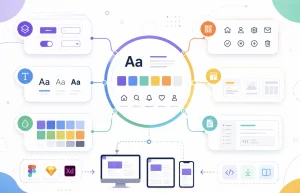
Tokens, components, and rules — so design and development speak the same language.
 Add the solutions you’re interested in to “My project”
 Submit a request and get the result



We guarantee the quality of our services

Included in service
 Describing component usage rules
Setting up Figma variables and styles
Setting up the grid and spacing system
Assembling examples of typical screens
Building a component library with states
Handing over the system with team training
Creating color and typography design tokens
Auditing the current interface and components
Describing component usage rules
Setting up Figma variables and styles
Setting up the grid and spacing system
Assembling examples of typical screens
Building a component library with states
Handing over the system with team training
Creating color and typography design tokens
Auditing the current interface and components 
Additional services

FAQ
What is a design system and why do we need one?
It is a single source of truth for your product’s design: color and typography tokens, a component library with states, and rules for using them. It removes inconsistency between layouts, speeds up the design of new screens dramatically, and saves development time.
When is it time to implement a design system?
When identical elements look different in different parts of the product, new screens take long to design, and the team has more than one designer or developer. If your product is a 10-screen MVP, a full system is not needed yet: a basic UI kit is enough.
What is included in the base price?
Design tokens, grids and spacing, a library of up to 30 base components with states, documentation with usage rules, examples of typical screens, and configured Figma variables. Components are delivered in the desktop version; mobile variants and redrawing real product screens are add-on services.
We already have product layouts. Do you build the system from them?
Yes, that is the best scenario: we audit the existing interface, find all the element variations, consolidate them into unified components, and systematize them. The product does not have to be redrawn afterward — the system describes its organized version.
How is a design system different from a UI kit?
A UI kit is a set of elements: buttons, fields, cards. A design system is the kit plus tokens, usage rules, documentation, and the links between components. The kit answers “what exists”, the system also answers “how to use it”.
Do you write the component code?
No, we work in Figma. But we build the structure and naming so developers can transfer the system into code without translation: tokens map to CSS variables, components map to your UI framework.
How many components are included and what if we need more?
Up to 30 base ones — this covers most products: buttons, fields, forms, cards, navigation, modals, notifications. Complex components such as data tables, charts, and calendars are designed as an additional block.
How will the team learn to use the system?
We run a training session: we show the structure, the token logic, and how to assemble screens from components. After that — the documentation as a reference, and a month of support as an add-on service if you want a safety net at the start.
The product keeps growing. What about new components?
The documentation includes rules for creating new components: naming, states, tokens. Your designer extends the system by these rules — or we do it within the support period or as separate blocks.
Are revisions included in the price?
Yes, 2 rounds of revisions within 7 days after delivery. We approve the system structure and visual direction at the start — using the tokens and 3–5 key components as an example, so the final revisions are usually minor.



Team that responds for results



Solutions, not ideas

Fixed process
Proven stack


Accountability for results



600+ companies trust us
















Leave a request – we'll respond within 30 minutes*


